A local home for your coding agents

Your agents.
One local office.

See which coding agents are working or need your input. Inspect reported usage, keep reusable task briefs, and explicitly start new local CLI tasks. Your sessions and permissions stay with your tools.

Free & open source. No account needed for the office.

A room for the work in your terminalsv0.5.0
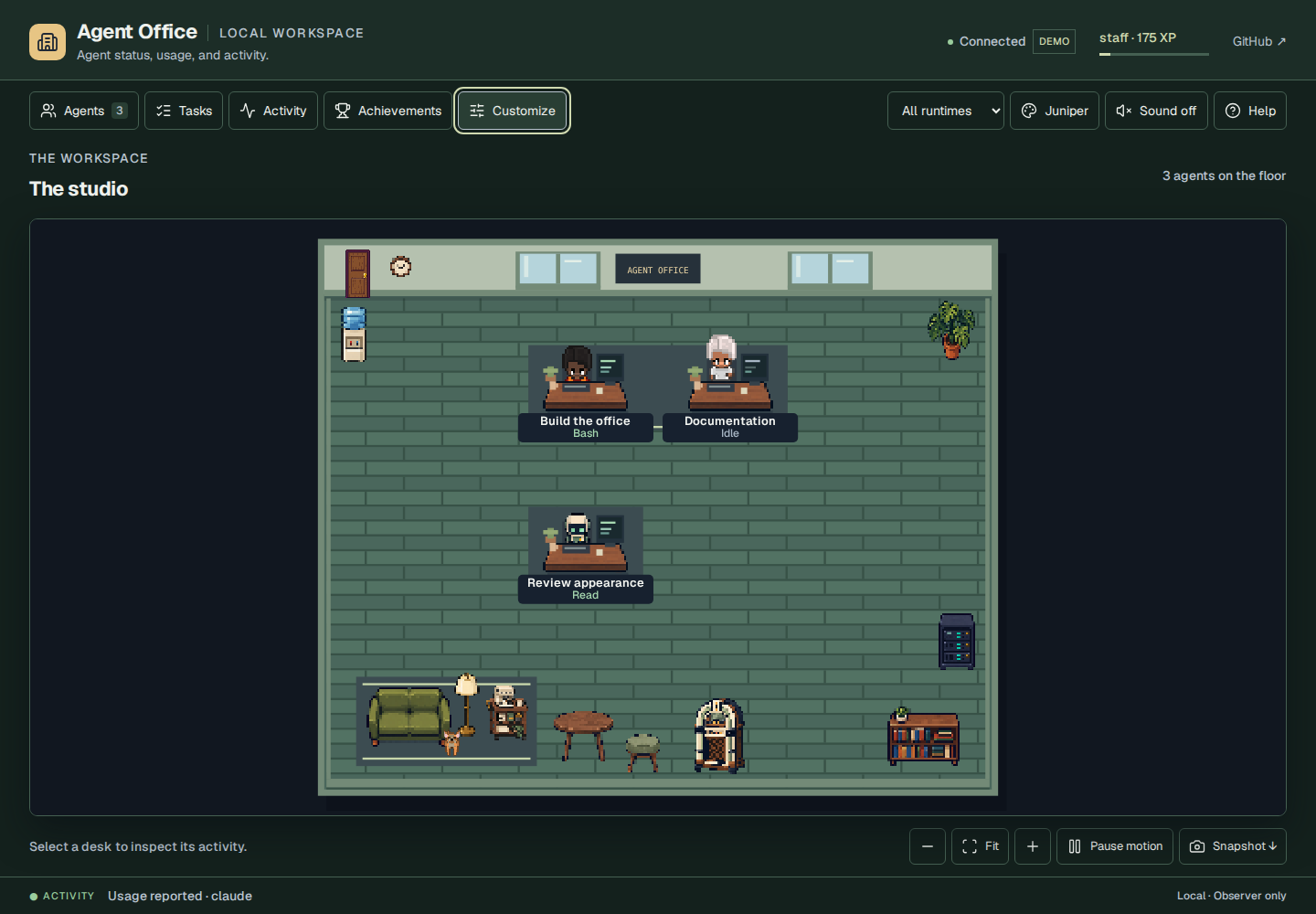
Agent Office in the green Juniper theme, with people and a robot at walnut desks, a lounge, and room controls.
Actual app Screenshot with synthetic example sessions
Local by defaultYour observer runs on your computer Python 3.10+No frontend build to run the app Five runtime adaptersWith explicit coverage and limits MIT codeRead it, change it, make it yours

A useful view, with a little personality

Less checking.
More knowing.

When several agents are working at once, the hard part is keeping context. Agent Office brings their observed activity into one place, while you keep using the tools you already know.

01 / Attention

Find the session
that needs you.

Questions and permission requests stay visible. Jump to the relevant session details, then respond in the original runtime.

Waiting for inputA clear cue, tied to a reported event
02 / Context

A record you can
actually inspect.

Read retained events, follow parent and child sessions, and inspect token usage with its source. Missing data stays clearly marked.

Current toolsSession historyReported usage
03 / Local tasks

Review a brief.
Start a task.

Choose a configured project and a supported CLI, review the exact prompt, then press Run. Read output, cancel a process, or reuse the brief. Nothing starts from a furniture click or an observed event.

Enable local runs

Take a look around

A dashboard.
With a door and a fish tank.

Try the interactive demo
A Juniper-themed office with working agents, a delegated robot, and clickable furniture.
01 / The floor

Work has a place.

Every observed session gets a character. Tools, input requests, and delegated work have visible states, so you can inspect the activity behind the animation.

  • Session activity and source-reported task lists
  • Optional local CLI runs with output and cancellation
  • Reusable briefs with reviewed JSON backup import/export
  • Room view, quick Find, follow, zoom, and snapshots
How the observer works
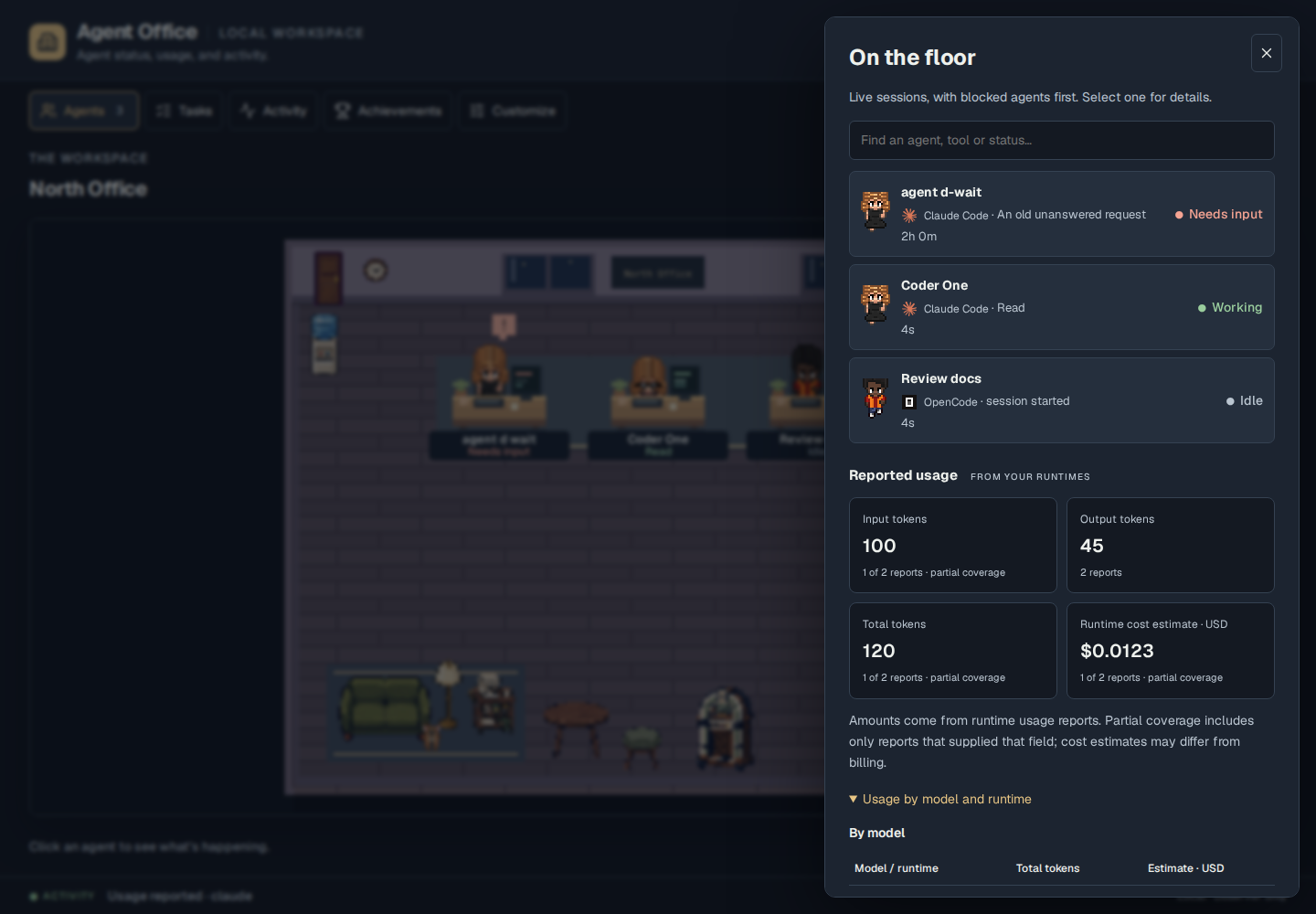
Agent Office's usage panel with token totals, runtime estimates, coverage, and source details from synthetic sessions.
02 / Reported usage

Numbers with context.

Inspect usage by runtime, model, and session. See which counters were reported and where a cost estimate came from. Unknown values never turn into a reassuring zero.

  • Per-agent usage details
  • Retained accounting through history pruning
  • Optional cost threshold notices
  • A recent-activity recap with a link to saved history

Coverage depends on the runtime. Estimates are not provider invoices.

Read the coverage details
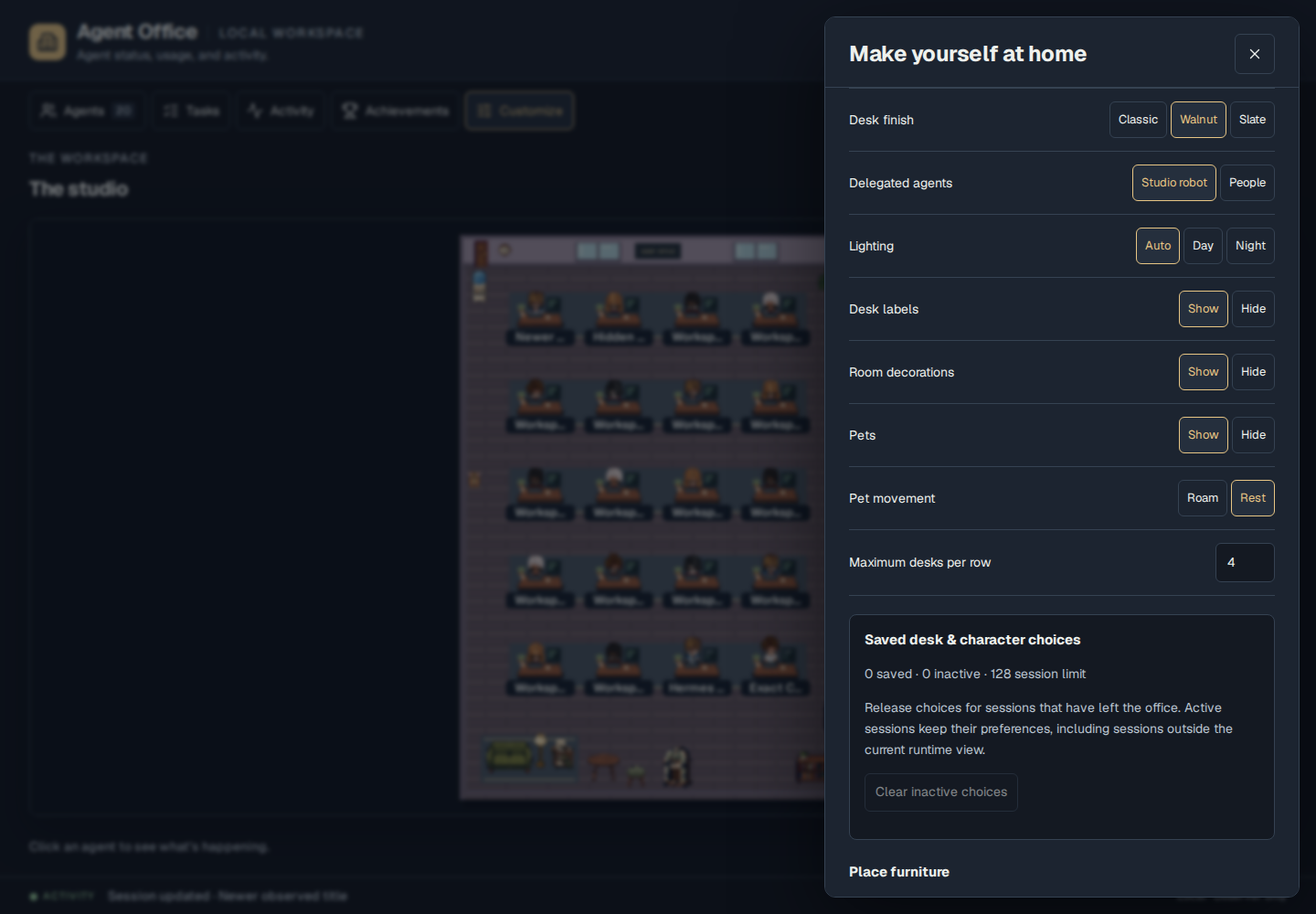
The Agent Office customization panel over the office floor, with room and appearance settings.
03 / Your room

Make it feel familiar.

Choose oak or slate floors, a theme, and recognizable characters. Arrange the space with furniture that opens useful views when you click it.

  • Placeable props, including earned room additions
  • Undo, redo, and portable room preferences
  • Walking and activity animations that respect Pause
  • Searchable sprites with native PNG and strip downloads

Appearance changes never inflate work XP. XP represents observed activity, not work quality.

Customize the room
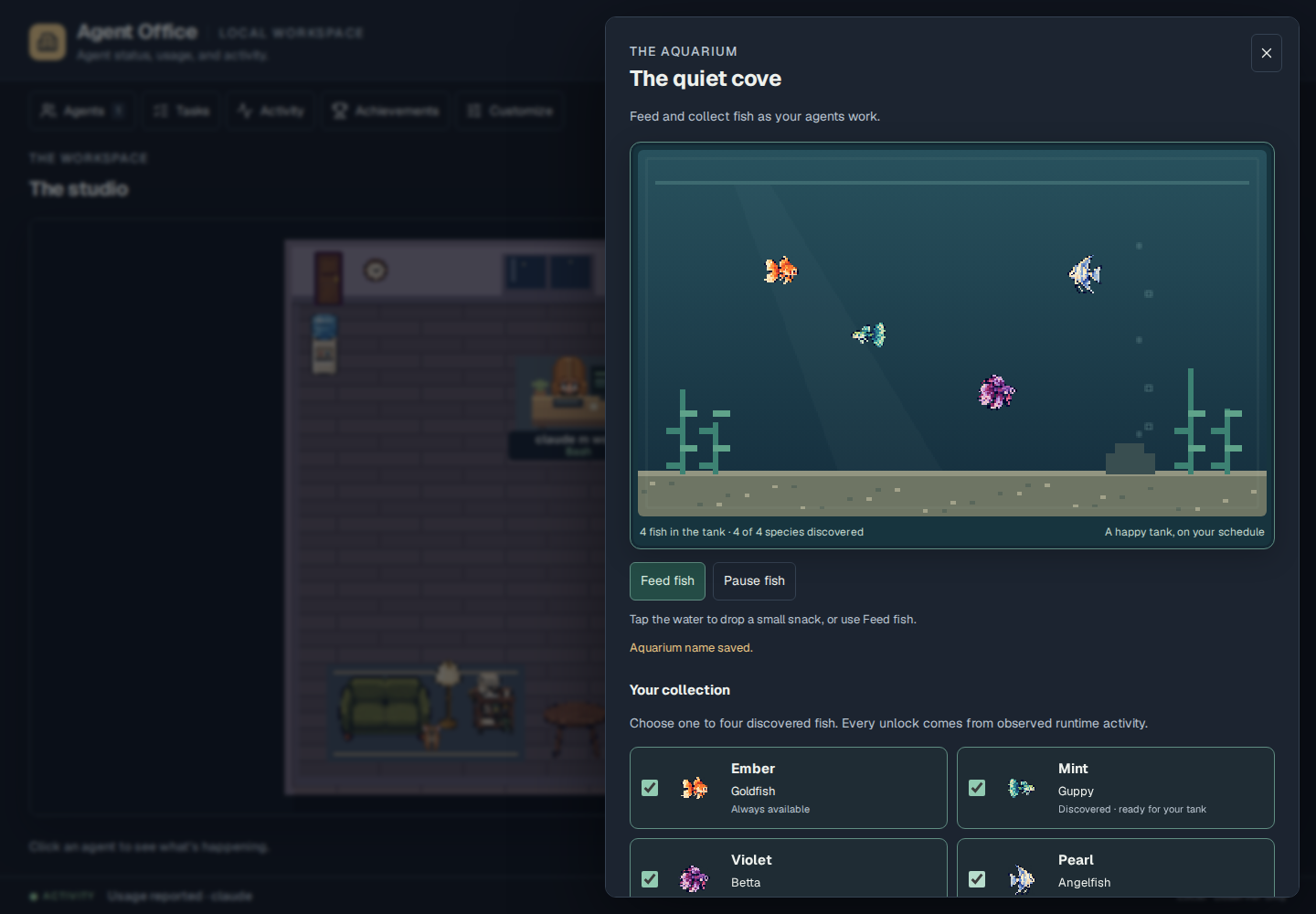
An interactive aquarium with colorful pixel fish, feeding controls, and a species collection.
04 / A little downtime

Enjoy the room.

Feed your fish, unlock species, and choose the aquarium’s residents. Choose cats, dogs or a pocket robot, or put on an original jukebox loop.

  • Four collectible fish species
  • Companion looks, roaming, and placeable nap beds
  • Duck Hunt, Breakout and Snake in the room’s arcade
  • Audio starts only when you press Play

Motion can be paused. Your reduced-motion preference is respected.

Explore the room’s arcade

These are screenshots of the actual app using synthetic test sessions. The public demo is an isolated example; it cannot see your local agents.

Keep your tools. Add a view.

Meet your agents
where they work.

Agent Office reads local observer events. Each adapter has a defined scope, and the interface shows when a runtime hasn’t supplied a value.

Hermes

CLI and Telegram sessions, tools, approvals, and subagents.

API usage when the installed hook supports it

OpenCode

Sessions, tools, permissions, questions, and child sessions.

Assistant-message tokens and runtime estimates

Claude Code

Session, prompt, tool, approval, question, and subagent hooks.

Token usage is not supplied by these hooks

Codex

Lifecycle and subagent hooks, with explicit local hook trust.

Optional usage from a captured exec JSON stream

Gemini CLI

Session start/end and agent-loop busy/idle observations.

Lifecycle only; tools and usage are not reported

Keep the office beside your code.

The included VS Code view opens the same local dashboard inside your editor.

VS Code setup

Connect just the runtimes you use. Preview what the installer detects, then choose the integrations to add. Connection steps. See tested coverage and validation limits.

Move in

Your office.
Your machine.

Start the local observer, connect the runtimes you already use, and open your floor. The app needs Python 3.10 or later. Git is used for the checkout below.

Full installation guide

The server binds to 127.0.0.1. The office serves local assets with no analytics. Observation makes no model-provider requests; an explicitly launched CLI uses its own account and billing.

Make yourself at home

Start the office

In a terminal, clone the repo and start the server:

git clone https://github.com/NosytLabs/agent-office.git
cd agent-office
python3 run.py

Then open http://127.0.0.1:8113. Keep this terminal running.

Connect existing runtimes

From the same checkout, in a second terminal:

python3 install.py --dry-run
python3 install.py --only codex

The first command previews detected integrations without changing configuration. The second connects only Codex. Replace codex with the tools you use: hermes, opencode, claude, codex, gemini, or vscode. Unrelated configuration is preserved. Restart the selected runtimes afterward. The installer does not install the CLIs themselves.

For Codex, review and trust the hook through /hooks. Existing OpenCode JSONC receives manual setup instructions.

Open the editor view

The installer can add the included VS Code extension. Keep the local server running, reload VS Code, and run this command from the Command Palette:

Agent Office: Open Floor

For remote workspaces or a different local port, follow the extension connection guide.

Start a new local CLI task

Optional: install and sign in to Codex, Claude Code, or OpenCode first. Stop the existing office server, then restart it with your project’s absolute path in place of the example:

python3 run.py --enable-task-runner --workspace /absolute/path/to/project

Open Tasks → Local runs, choose the project and CLI, review the prompt, then press Run task. This starts a new process, not a message to an existing session. The CLI uses its own account, permissions and billing. The hosted demo cannot run commands on your computer.

Runtime requirements, cancellation and delivery limits.

Before you move in

A few useful answers.

Does Agent Office control my agents?

It observes connected sessions by default. Enable the optional local task runner to start a new Codex, Claude Code, or OpenCode task in a configured project, follow its output, and cancel it. Respond to existing sessions' questions and permission requests in the original runtime. Set up local task runs.

Is the demo connected to real agents?

The public demo uses fictional sessions, activity, XP, and usage. Its preferences stay in your browser. To observe actual work, run the local server and install the adapters on the same computer as your runtimes.

How accurate are the usage and cost numbers?

The office records the counters a supported source reports, with replay protection and corrections. It keeps unavailable values distinct from zero and labels partial coverage. Cost values are runtime estimates when supplied, not provider invoices. Read each adapter’s scope.

Will the activity log keep growing?

Retained raw history defaults to the newest 1,000 events within seven days and 5 MiB. Change all three limits in Customize. History pruning preserves earned progress, usage totals, and unanswered approvals. Usage identities remain separately for corrections, so this is not a hard cap on the entire database. If retention settings cannot be read safely, automatic pruning pauses while observation continues.

What is free, and what can I customize?

The repository’s code is MIT licensed. Run it locally and customize the themes, names, characters, furniture, aquarium, and music. Runtimes and model providers have their own requirements and pricing. Optional commercial Smallburg art is not bundled; the public app includes original fish sprites.

What is still being built?

Tasks brings together session activity, reported lists, saved briefs with backup import/export, and optional new local runs. Sending work into existing OpenCode sessions, interactive terminals, and scheduled orchestration are not available. The audit record separates verified behavior from remaining work.

Open source. Open door.

Give your work
a place to land.

Try the room. Read the code. Help make the next version better.